

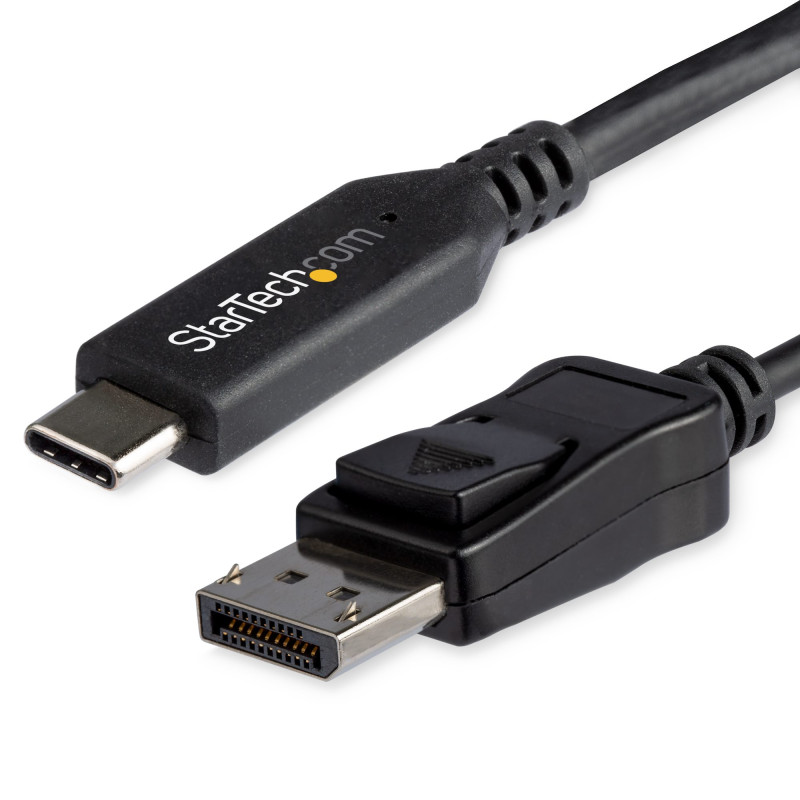
StarTech.com 6ft (1.8m) USB C to DisplayPort 1.4 Cable - 4K/5K/8K USB Type-C to DP 1.4 Alt Mode Video Adapter Converter - HBR3/HDR/DSC - 8K 60Hz DP Monitor Cable for USB-C/Thunderbolt (CDP2DP146B)

SKU: CDP2DP146B
Options
Product Description
This USB-C to DisplayPort 1.4 cable lets you connect your USB Type-C device to a DisplayPort monitor with just one cable, providing you with a convenient, clutter-free solution.
Incredible Picture Quality
Supporting four times the resolution of 4K, this 8K DP 1.4 adapter cable delivers the stunning quality of UHD at resolutions up to 7680×4320, and also features HBR3 functionality, providing a bandwidth of up to 32.4Gbps.
With cutting-edge picture quality, this cable is ideal for:
- Displaying crisp digital signage walls
- Creating eye-catching visuals for photography and videography
The USB-C to DP cable is backward compatible with 4K and 1080p displays, which makes it a great accessory for home, office or other work environments, while future-proofing for 8K implementation.
At 6 ft. (1.8 m) in length, this DisplayPort adapter cable delivers a direct connection that eliminates excess cabling, ensuring a tidy installation. For installations requiring a shorter length, we also offer a 3.3 ft. (1 m) DisplayPort cable, enabling you to customize your connection needs. Clutter-Free Installation
Hassle-Free Setup
To ensure easy operation, this DisplayPort converter cable supports plug-and-play installation, removing the need for additional software or drivers.
CDP2DP146B is backed by a 3-year StarTech.com warranty and free lifetime technical support.
Note:
- Your USB-C device must support DP Alt Mode to work with this adapter cable.
- To achieve 8K resolutions, your source and your destination must support DisplayPort 1.4.
Applications
- Stream 8K video to a DisplayPort 1.4 screen or monitor
- Deliver eye-catching presentations while you’re on the go
- Ultimate accessory for early adopters of 8K technology
- Perfect for creative professionals
Specifications
Warranty Information
Warranty
3 Years
Connector(s)
Connector A
1 - USB-C (24 pin) DisplayPort Alt Mode
Connector B
1 - DisplayPort (20 pin)
Environmental
Operating Temperature
5°C to 35°C (41°F to 95°F)
Storage Temperature
-20°C to 60°C (-4°F to 140°F)
Humidity
80%-90%RH
Hardware
Active or Passive Adapter
Active
AV Input
USB-C
Ports
1
AV Output
DisplayPort - 1.4
Chipset ID
STM32F072CBY6TR
Packaging Information
Package Height
0.2 in [5.0 mm]
Package Length
7.9 in [20.0 cm]
Shipping (Package) Weight
2.3 oz [65.0 g]
Package Width
8.7 in [22.0 cm]
Package Quantity
1
Performance
Audio Specifications
DisplayPort - 7.1 Channel Audio
Video Revision
DisplayPort 1.4
Supported Resolutions
DisplayPort: 7680x4320 (8K) / 60Hz
Wide Screen Supported
Yes
Bandwidth
HBR3
Physical Characteristics
Color
Black
Product Height
0.5 in [1.2 cm]
Product Length
5.9 ft [1.8 m]
Weight of Product
1.9 oz [55.0 g]
Product Width
0.8 in [2.0 cm]
Special Notes / Requirements
System and Cable Requirements
Your USB-C port must support DisplayPort over USB-C (DP Alt mode) in order to work with this adapter.
To achieve 8K resolutions, your source and your destination must support DisplayPort 1.4.
What's in the Box
Included in Package
1 - USB-C to DisplayPort Adapter
In accordance with Quebec's Bill 29, our company and its affiliated partners expressly declare that we cannot guarantee the availability of spare parts, repair services, or the necessary information for the maintenance or repair of our products. For any questions regarding availability, please consult the manufacturer's website(s) directly. Learn more
This information does not limit the good working order warranty or other legal warranties. CIPC remains responsible for honouring applicable warranties.